Report Wizard
The Utilities → Report Wizard section is used to generate and export reports based on Liner data. It’s typically used for analysis, cross-checking, and sharing stats with external systems or with a client. Unlike analytics dashboards, reports here are exported as a table and meant to be used outside the system.
This section works well for:
- regular reporting,
- deep dives into leads and calls,
- checking whether processing was done correctly,
- sharing data with clients or management.
Available report types
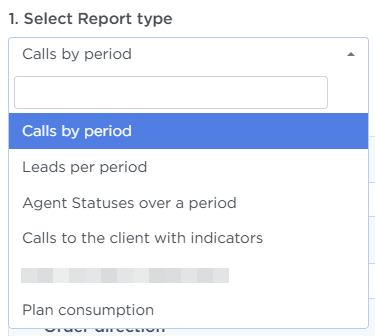
- Leads per period — a list of leads that were created or processed within the selected time range.
- Calls by period — details on all calls within the selected time range, both inbound and outbound.
- Agent statuses over a period — a list of statuses an agent set during the selected period, plus the time spent in each status. Used to analyze an agent’s working time.
- Calls to the client with indicators — call statistics (successful and unsuccessful), including transfers to Sales, broken down by client / time / day of week.
- Plan concumption — a breakdown of costs for services.
Report options
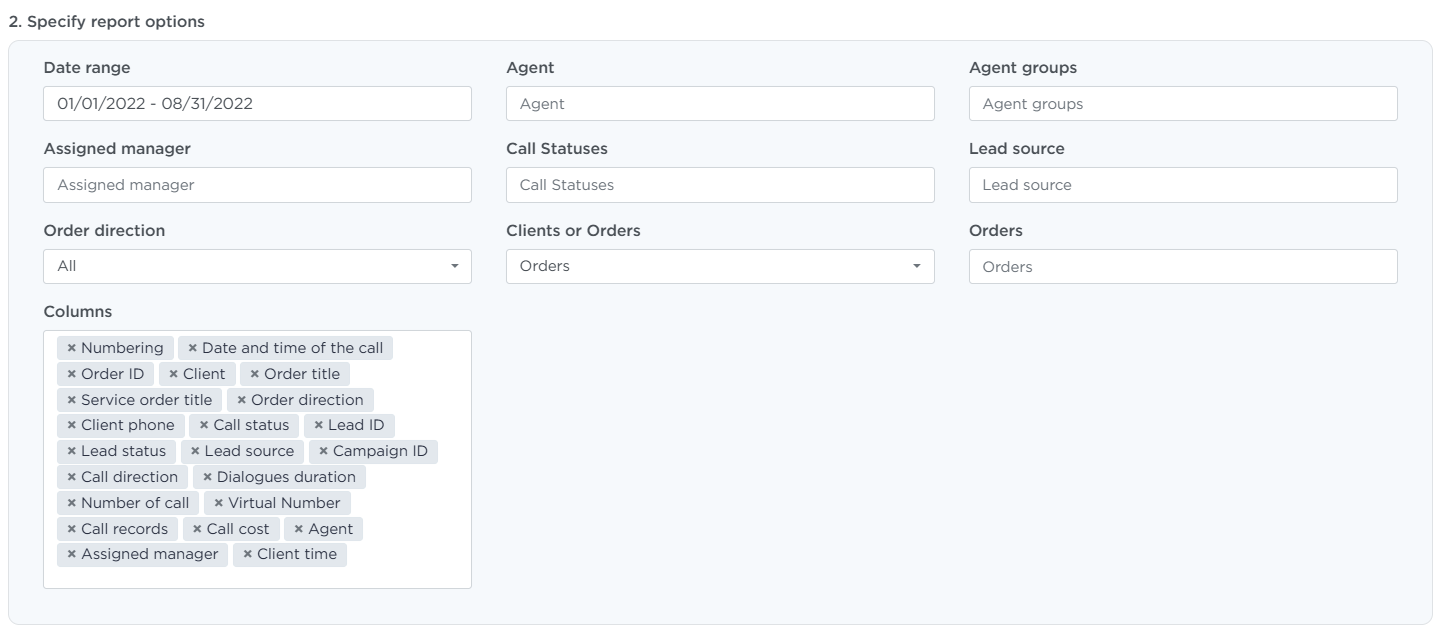
To generate a report, set the parameters you need. The exact set depends on the report type, but the logic is the same.
Most commonly available:
- Date range — the date range the report is built for
- Order — one or more orders
- Agent — select call-center operators
- Clients — the customer (if multiple clients are used)
- Lead type, Lead source — for lead reports
- Order direction, Call statuses — for call reports
- Columns — which fields will be included in the final report
Generating a report
To generate a report:
- Open Utilities → Report Wizard,
- Pick a report type,
- Select the required parameters,
- If needed, enable the Recieve report via Email toggle,
- Click Generate the report,
- The result will be emailed or downloaded as an
XSLXfile.

Pay attention
Generating a report can take some time if you choose a large date range or a big dataset.