Call Statuses
Note
A call status is the outcome of a single phone attempt with a lead. The status is saved right after the attempt ends. For more about how call statuses differ from lead statuses, see 👉 Differences Between Call Status and Lead Status.
Liner comes with a set of built-in call statuses you can use from day one. As you work with leads, you might want to add more detailed reasons for unsuccessful calls — for example, no answer, picked up and dropped, busy, or number in blacklist.
Each call status is linked to a lead status. When a call is finished and you select a specific call status, the system automatically assigns the corresponding lead status.
To create or manage call statuses, go to Parametres → Call statuses.
General Information
The page shows a list of all call statuses and includes a search bar. After reading this article, you’ll know how to:
- find a specific call status,
- create a new call status or edit an existing one.
Managing Call Statuses
Call Status List
Each status in the list includes:
- Title — the system ID is shown in parentheses,
- Sort — defines the order in which the status appears,
- Required comment — shows whether a comment must be added when selecting this status,
- Lead status — the lead status linked to this call status,
- Status type — system or custom,
- Show to agent — whether the status is available to agents,
- Show to AI-agents — whether the status is available to AI agents,
- Actions — edit button.
Searching for a Call Status
To find a status, type its name or system ID into the Search field. The list will narrow down to the matching items.
System Call Statuses
By default, Liner only includes system call statuses—these are enough for basic platform use.
- Qualified — A general status indicating the lead is a match. This is shown to the agent by default unless hidden via the Show to agent toggle in the status settings.
- Disqualified — A general status indicating the lead is not a match. This can also be hidden by editing the status settings.
- Voicemail — Automatically assigned by the system if an answering machine picks up instead of a live person.
- Call terminated — Automatically assigned if the system fails to reach the lead during a predictive dial and ends the call.
- Not accepted by operator — Automatically assigned when a connection is established with the lead, but the agent cannot take the call due to technical issues.
- Post processing not completed — Automatically assigned when an agent doesn't finish the post-call work (for example, if they refreshed the page).
- Missed by the system — Automatically assigned if the system couldn't reach the lead due to technical errors.
Creating a Call Status
To add a new call status, click Create call status.
You can find more details about creating statuses here 👉 Quick Start.
Editing Call Statuses
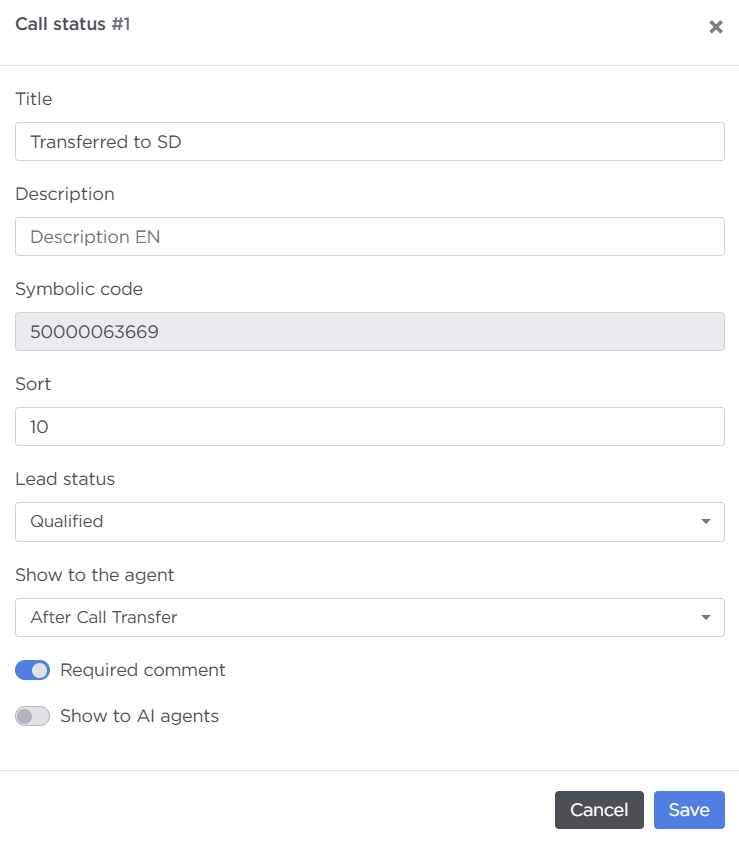
-
To edit a status, click the pencil icon in the Actions column.
The Symbolic code field is locked for editing, as it’s used internally in the database and cannot be changed.
-
Call statuses cannot be deleted — you can only hide them from agents in the settings.